
156 lines
4.9 KiB
Markdown
156 lines
4.9 KiB
Markdown
# plug-in custom functions, parameters, rounding
|
||
Configuration of this plug-in supports the following parameters:The configuration shown here is the default configuration
|
||
```json
|
||
{
|
||
"showLevel": true,
|
||
"associatedWithSummary": true,
|
||
"printLog": false,
|
||
"multipleH1": true,
|
||
"mode": "float",
|
||
"showGoTop":true,
|
||
"float": {
|
||
"floatIcon": "fa fa-navicon",
|
||
"showLevelIcon": false,
|
||
"level1Icon": "fa fa-hand-o-right",
|
||
"level2Icon": "fa fa-hand-o-right",
|
||
"level3Icon": "fa fa-hand-o-right"
|
||
},
|
||
"pageTop": {
|
||
"showLevelIcon": false,
|
||
"level1Icon": "fa fa-hand-o-right",
|
||
"level2Icon": "fa fa-hand-o-right",
|
||
"level3Icon": "fa fa-hand-o-right"
|
||
}
|
||
}
|
||
```
|
||
|
||
## showLevel : TYPE:boolean。
|
||
Whether the title display hierarchy serial number. The page title and title in the navigation will add level display.(controls whether the title of the page is overwritten)
|
||
|
||
```
|
||
---- xx.md ---
|
||
# h1
|
||
## h2
|
||
### h3
|
||
|
||
Page effect of the display hierarchy is as follows:
|
||
1. h1
|
||
1.1. h2
|
||
1.1.1 h3
|
||
```
|
||
## associatedWithSummary : TYPE:boolean
|
||
The serial number of the page within the summary.md. The md official default theme generated serial number associated with it.
|
||
```
|
||
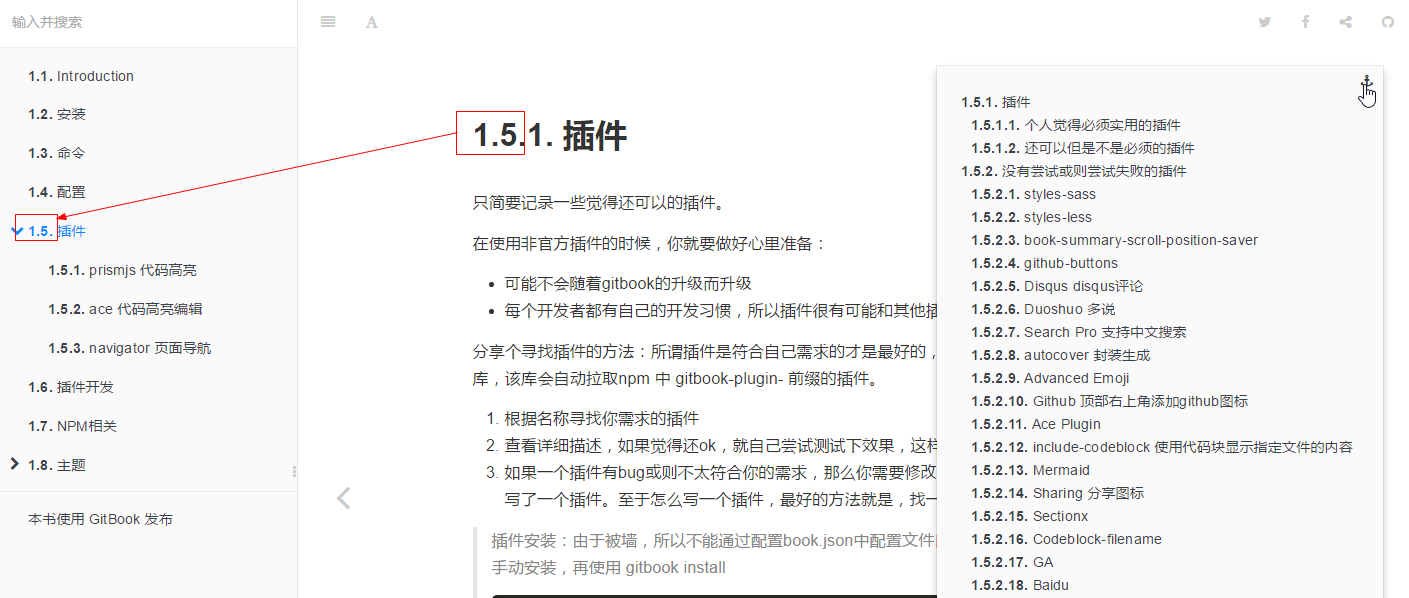
If you open the level display in the default theme website:
|
||
"pluginsConfig": {
|
||
"anchor-navigation-ex": {
|
||
"associatedWithSummary":true
|
||
},
|
||
"theme-default": {
|
||
"showLevel": true
|
||
}
|
||
}
|
||
So write like this:
|
||
|
||
----- SUMMARY.md ------
|
||
# Summary
|
||
|
||
* [安装](chapter/install.md)
|
||
* [命令](chapter/command.md)
|
||
* [配置](chapter/bookjson.md)
|
||
* [插件](chapter/plugin.md)
|
||
* [prismjs 代码高亮](chapter/plugin/prismjs.md)
|
||
* [ace 代码高亮编辑](chapter/plugin/ace.md)
|
||
* [navigator 页面导航](chapter/plugin/navigator.md)
|
||
|
||
----- chapter/redis/cluster.md ------
|
||
# redis集群的准备
|
||
## zlib
|
||
1. 安装redis-cluster依赖:redis-cluster的依赖库在使用时有兼容问题,在reshard时会遇到各种错误,请按指定版本安装.
|
||
2. 确保系统安装zlib,否则gem install会报(no such file to load -- zlib)
|
||
|
||
...
|
||
```
|
||
So the result is as follows:
|
||
|
||
|
||
## printLog : TYPE:boolean(V1.0.6+)
|
||
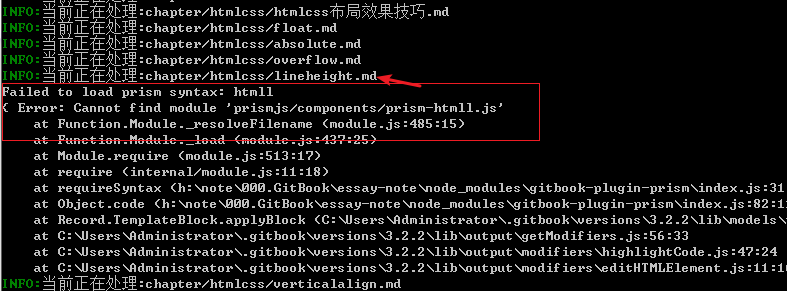
Whether to print the processing log is useful in troubleshooting the failure to generate book, and to know which file is wrong
|
||
As shown below, other plug-ins are used, but only the error messages are printed, and which file is not known. Open this option and you'll see
|
||
|
||
|
||
## multipleH1 : TYPE:boolean(V1.0.6+)
|
||
Is it a multi H1 mode? A normal book. One chapter has only one H1 tag, that is, a MD file and a label. If your books are in this normal mode, close this option, =false
|
||
The biggest difference is as follows
|
||
```
|
||
---- multipleH1=true----
|
||
# 多H1标题1
|
||
## 子标题
|
||
# 多H1标题2
|
||
## 子标题
|
||
## 子标题
|
||
|
||
生成的标题如下:
|
||
1. 多H1标题1
|
||
1.1. 子标题
|
||
2. 多H1标题2
|
||
2.1. 子标题
|
||
2.2. 子标题
|
||
|
||
---- multipleH1=false----
|
||
# 多H1标题1
|
||
## 子标题
|
||
# 多H1标题2
|
||
## 子标题
|
||
## 子标题
|
||
|
||
生成的标题如下:
|
||
多H1标题1
|
||
1. 子标题
|
||
多H1标题2
|
||
1. 子标题
|
||
2. 子标题
|
||
|
||
See the difference? Normal book mode, that is, only one H1 case, the display of the sort number more in line with our needs.
|
||
```
|
||
|
||
## mode
|
||
There are three kinds of navigation mode:
|
||
|
||
1. float :floating navigation
|
||
2. pageTop : internal at the top of the page navigation
|
||
3. '' : don't show navigation
|
||
|
||
## float
|
||
mode = float The following configuration to take effect
|
||
```
|
||
float: { //浮动导航设置
|
||
"floatIcon": "fa fa-navicon", // 配置导航图标,如果你喜欢原先的 锚 图标可以配置为 fa-anchor
|
||
"showLevelIcon": false, //是否显示层级图标
|
||
"level1Icon": "fa fa-hand-o-right", //层级的图标css
|
||
"level2Icon": "fa fa-hand-o-right",
|
||
"level3Icon": "fa fa-hand-o-right"
|
||
}
|
||
```
|
||
Icon to use the default theme website to introduce the CSS `http://fontawesome.dashgame.com/`
|
||
|
||
## pageTop
|
||
mode = pageTop The following configuration to take effect
|
||
```
|
||
pageTop: {
|
||
showLevelIcon: false,
|
||
level1Icon: "fa fa-hand-o-right",
|
||
level2Icon: "fa fa-hand-o-right",
|
||
level3Icon: "fa fa-hand-o-right"
|
||
}
|
||
```
|
||
## showGoTop : TYPE:boolean (V1.0.11+)
|
||
|
||
The return top button is separated, and the return top button is displayed for true
|
||
|
||
# additional support function
|
||
- Adding `<extoc></extoc>` tags to a page generates the TOC directory here.
|
||
- in the page to add `<! - ex_nonav ->` logo, will make this page does not generate suspended navigation
|
||
|
||
In the home page, the introduction page and other places can use this function, can block some code, because these places can not load css
|